Your clients, programs and follow-up in one place.
See who needs you, build the program, send it. Your client has it in the app the same second. $29 a month, however many clients you have.
No contract. Cancel any time.
The day starts with the queue
The trainer portal opens on a list of what is actually waiting for you — a request, a client who hasn't trained in twelve days, a program with no starting values — and closes when you're done. Open it again in a browser; there is nothing to install.
From invitation to adjusted program
The four things you do over and over. Same account and same data throughout, whether you are at a desk or on the gym floor with your phone.
- 01
Invite the client
Send a link by email. They open it on their phone, the app starts, and you are connected. You can see the invitation's status until it's accepted.
- 02
Build the program
Lay out weeks and days with exercises, sets, reps, weight, rest and RPE. Save it as a template and reuse it for the next client with their own starting values.
- 03
Watch the sessions land
Completed sessions appear straight away, showing what the client actually lifted next to what you prescribed. You see adherence, volume and new records.
- 04
Adjust as you go
Change a set, swap an exercise, or send a message. Progressions are suggested, but nothing changes for the client until you approve it.
What you change, your client sees immediately
You get the tools. Your client gets an app that just shows today's session. It's the same data — not two systems you have to keep in sync.
How you build the day: exercises, sets, weight, rest and RPE, with notes for the client.
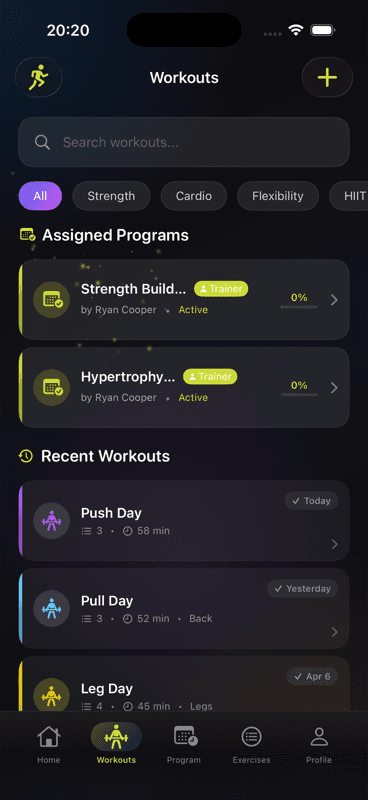
How your client gets it on their phone.
Free on iPhone and Android.
The app is free for your clients. No ads, no paywall, no premium tier they have to buy before they can follow the program you built.
And since you're running a business
Wrkout also handles the money, and the people who aren't clients yet. Payments run through Stripe Connect into your own account — so you don't need a spreadsheet alongside it.
Program and package sales. The figure under “Your payout” is what you keep after the 5% transaction fee.
Packages and invoices
Set up coaching packages at your own price, sell them directly, and keep track of invoices and payments.
Your own page
A public trainer page you set up yourself, on your own domain if you want. Enquiries from it land in your leads list.
Payouts
You connect your own Stripe account once, from the portal. Money goes straight there, not through us. Wrkout takes 5% of client payments made through the platform.
One price, however many clients
Excl. tax. Plus a 5% transaction fee on client payments made through the platform. No per-client pricing.
Annual: $296 — $52 less than paying month to month.
Your clients always use the app for free.
- Unlimited clients
- Unlimited programs
- Program builder and templates
- Exercise library with your own exercises
- Sessions in real time
- Progress and records per client
- Messaging with clients
- Program requests
- Marketplace and packages
- Trainer Mode in the mobile app
- 14-day free trial
- Cancel any time
Questions and answers
- What does Wrkout cost for personal trainers?
- $29 per month excl. tax, or $296 a year. Plus a 5% transaction fee on client payments made through the platform. Tax is added at checkout based on where you're located. You start with a 14-day free trial.
- Is there a limit on clients?
- No. Every trainer subscription includes unlimited clients, programs and sessions. You pay the same fixed price whether you have three clients or thirty.
- Do my clients have to pay for the app?
- No. The app is free for your clients — no ads, no paywall, no premium tier. They download it, accept your invitation, and start on the programs you build.
- How do clients connect to me?
- You send an invitation link from the trainer portal. Your client opens it on their phone, the Wrkout app starts, and they're connected to your trainer profile. You can see the invitation's status until it's accepted.
- Can I sell workout programs?
- Yes. You can publish programs in the marketplace and set up coaching packages at your own price. Payouts go to your own Stripe account, with a 5% transaction fee per sale.
- Which devices are supported?
- The trainer portal runs in any modern browser on desktop, laptop or tablet — no installation. You also get a Trainer Mode inside the mobile app for managing clients on the go. The client app is free on both iPhone and Android.
Anything else you're wondering about? support@wrkout.io
Try it with your own clients.
Create an account, build one program and invite one client. It takes a few minutes, and you'll know straight away whether it fits how you work.
No contract. Cancel any time.